CAPABILITIES // PLAN. SECURE. RUN.

Services built for security, reliability and calm operations.

Seven focused services across three practices: Cloud, Cybersecurity and IT Support. Each starts with a problem you need solved, and can be delivered as a scoped project, a fixed-scope assessment or ongoing support.

PRACTICE 01

Cloud

SERVICE GROUP 01 // MODERN WORKPLACE

Microsoft 365

A clean, secure, well-administered Microsoft 365 that your team can rely on, whether you're setting up a new tenant, tidying up an old one, or moving email and files across.

  • Tenant setup, clean-up and licensingAccounts, admin roles, licences, mail flow and sharing settings reviewed and put in order.
  • Exchange Online migrationA migration plan, pilot users first, and a cut-over approach agreed with you in advance, with a written rollback.
  • Security baseline and collaboration structureMFA and Conditional Access, mail protection, and a sensible Teams, SharePoint and OneDrive layout.
  • Documentation and handoverAdmin documentation and a walkthrough for whoever looks after the tenant day to day.

Related work: Exchange Online migration

01 // M365 TENANT HEALTH ILLUSTRATIVE
Exchange Onlinemail flow · protection policies
LIVE
Global adminsnamed, MFA-protected accounts only
REVIEWED
External sharingguests · anonymous links
SCOPED
Licencesassigned vs. in use
RECONCILED
Exchange OnlineTeamsSharePointEntra ID
SERVICE GROUP 02 // CLOUD INFRASTRUCTURE

Cloud Infrastructure & Migration

Move servers and workloads to Azure or Google Cloud with a plan, a rollback path and a secure, documented foundation, or get an existing cloud environment back under control.

  • Readiness assessmentInventory servers, applications and dependencies; decide what to move, rebuild, replace or retire.
  • Foundation before workloadsSubscriptions or projects, networking, identity and access, backup and monitoring designed first.
  • Workload-by-workload migrationEach move with its own cut-over window, test criteria and rollback, validated before old systems are switched off.
  • Optimise and hand overRight-sizing, cost tagging, architecture documentation and an operations runbook.
02 // MIGRATION PLAN ILLUSTRATIVE
Wave 1 · File & printrebuild as cloud service
MIGRATED
Wave 2 · App serverslift & shift · rollback tested
IN PROGRESS
Wave 3 · Databasecut-over window agreed
SCHEDULED
Legacy serverno longer needed
RETIRE
Microsoft AzureGoogle CloudHyper-V / VMwareBackup & DR
SERVICE GROUP 03 // MODERN WORKPLACE

Google Workspace

A properly administered and secured Google Workspace, or a clean move between Google Workspace and Microsoft 365, planned so nobody loses mail, files or calendars on the way.

  • Admin console and OU structureRoles, organisational units and policies that match how your team works.
  • Security and sharingEnforced 2-Step Verification, sensible sharing defaults, device rules and mail authentication.
  • Migrations in either directionMail, files and calendars moved between Workspace and Microsoft 365 with a pilot group and a scheduled cut-over.
03 // WORKSPACE ADMIN REVIEW ILLUSTRATIVE
2-Step Verificationenforced for all users
External Drive sharingallow-listed domains only
Super adminstwo named accounts
REVIEWED
Mail authenticationSPF · DKIM · DMARC
PASS
Admin ConsoleGmailShared DrivesEndpoint Management
PRACTICE 02

Cybersecurity

SERVICE GROUP 04 // IDENTITY, ACCESS & DEVICES

Identity, Access & Devices

Every person and every device verified, and access matched to each role, with MFA, Conditional Access and device management set up so they protect the business without getting in people's way.

  • MFA and Conditional AccessReport-only mode first, pilot groups next, and emergency-access accounts in place before anything is enforced.
  • Hybrid identity and single sign-onOn-premises Active Directory working with Microsoft Entra ID, so people use one identity everywhere.
  • Intune device managementEnrolment, compliance and configuration policies, and patching for each platform you use.
  • Joiner, mover and leaver processDocumented lifecycle steps so access stays correct after handover.

Related work: Hybrid identity Intune device management

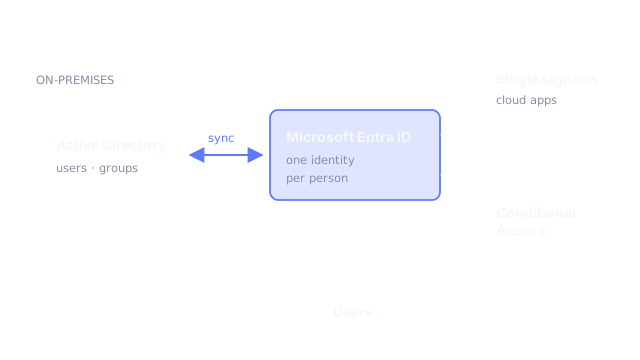
04 // HYBRID IDENTITY GENERALISED DIAGRAM
Generalised diagram: on-premises Active Directory syncs to Microsoft Entra ID, providing single sign-on and Conditional Access for users.
Microsoft Entra IDConditional AccessIntuneActive Directory
SERVICE GROUP 05 // DOMAIN & EMAIL SECURITY

Domain, DNS & Email Security

Make sure your email reaches inboxes, your domain can't be impersonated, and your website stays secure and online, with DNS that's clean, documented and under your control.

  • DNS audit and clean-upEvery record, mail flow and certificate inventoried, with every change sequenced and reversible.
  • SPF, DKIM and DMARC to enforcementEvery legitimate sender authenticated, then DMARC raised from monitoring as reports show it's safe.
  • Cloudflare, SSL/TLS and registrar hardeningRegistrar lock and account MFA, TLS done properly, and Cloudflare onboarding where it makes sense.
05 // DNS · EXAMPLE.COM ILLUSTRATIVE
SPF-all · single include
PASS
DKIM2048-bit · rotated
PASS
DMARCp=reject · reports on
ENFORCED
DNSSECsigned · registrar locked
OK
CloudflareSPF · DKIM · DMARCDNSSECSSL/TLS
SERVICE GROUP 06 // BEST PLACE TO START

Security Assessments

A fixed-scope review of one part of your environment, ending with a prioritised, plain-English report and a walkthrough call. You'll know what's working, what's at risk and what to fix first, whether or not we work together afterwards.

  • Email & Domain Health CheckDNS records, MX, SPF/DKIM/DMARC alignment, TLS and registrar security.
  • Microsoft 365 Security & Configuration ReviewMFA coverage, Conditional Access, admin roles, sharing and mail flow settings.
  • Google Workspace Security ReviewAdmin roles, 2-Step Verification, Drive sharing, devices and mail authentication.
  • Cloud Environment ReviewAzure or Google Cloud access model, network exposure, backup, monitoring and cost hygiene.

Related work: Vulnerability assessment

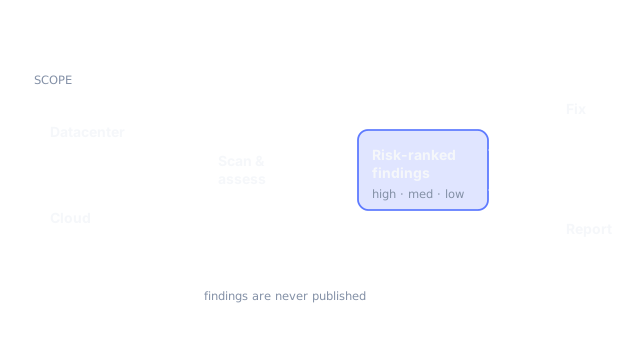
06 // ASSESSMENT WORKFLOW GENERALISED DIAGRAM
Generalised diagram: scope is scanned and assessed, findings are risk-ranked, then fixed and reported.
Fixed ScopeRisk-Ranked FindingsPlain-English ReportWalkthrough Call
PRACTICE 03

IT Support

SERVICE GROUP 07 // SUPPORT & OPERATIONS

IT Support & Operations

Healthy servers, devices and networks, with monitoring that tells you about problems before your users do, and an experienced engineer when something needs fixing.

  • Monthly IT supportReserved time each month for administration, changes and questions, with scope agreed per plan.
  • Monitoring and alertingThe signals that matter for your systems, with thresholds and alerts tuned so people actually read them.
  • Patching, hardening and backupsA patching routine, system hardening, and backups checked so restores work when you need them.
  • User and device supportRemote help for staff, accounts and devices, alongside your existing IT team if you have one.

Related work: Threat monitoring with Microsoft Sentinel

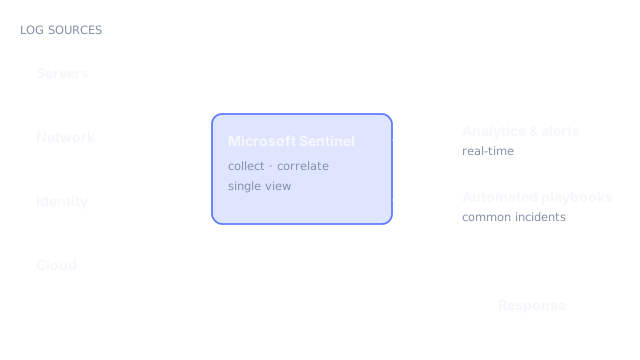
07 // MONITORING FLOW GENERALISED DIAGRAM
Generalised diagram: log sources feed a central monitoring platform that raises alerts and runs automated playbooks.
Windows ServerLinuxAzure MonitorMicrosoft Sentinel
HOW ENGAGEMENTS WORK

Three ways to work together.

Every engagement follows the same discipline: a written scope before work starts, changes in controlled stages, and documentation at the end.

START HERE//FIXED SCOPE

Assessment.

A fixed-scope review of one area, with a prioritised, plain-English report and a walkthrough call. The easiest way to start.

Findings ReportPrioritiesWalkthrough
DEFINED//OUTCOME

Project.

A defined outcome with a written scope, milestones, validation and handover. Migrations, rollouts and clean-ups.

Written ScopeMilestonesHandover
ONGOING//MONTHLY

Monthly IT Support.

Reserved time each month for administration, monitoring, changes and questions, with the scope agreed per plan.

AdministrationMonitoringUser Support
COMMON QUESTIONS

Answers before we begin.

The plan is built to prevent it. Everything that exists is mapped before anything moves, changes are made in a deliberate order, and each step has a written rollback. Where a change carries risk, we agree a time window with you first.
Happily. Many engagements are about adding senior capacity for a specific project, then leaving your team with documentation and runbooks they can maintain.
Usually a dedicated admin account with only the roles the work needs, protected by MFA. Access is agreed up front, kept to what the work requires, and removed at handover. Assessments use read-only access wherever possible.
If you already know what you need, such as a migration, a security review or monthly support, choose Request a Quote and we'll reply with questions or an initial scope. If you'd rather talk it through first, choose Book an Appointment and pick a preferred date.
READY WHEN YOU ARE // LET'S TALK

Bring integrity to every layer of your infrastructure.

Tell us what you're running, migrating or securing. We'll reply with clear recommendations, realistic next steps and a transparent scope.